
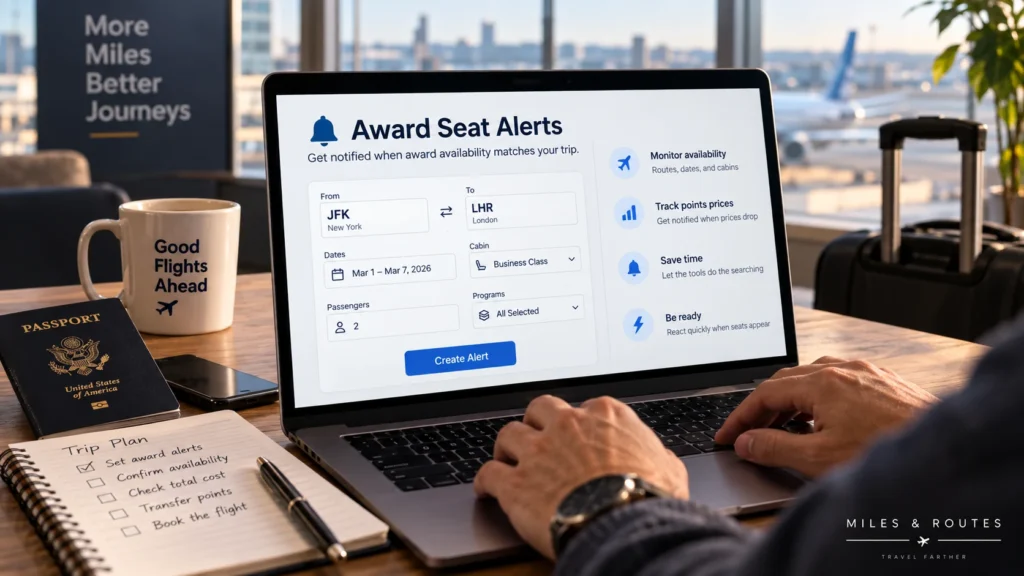
Finding an award seat once can be difficult. Checking the same route every morning for the next three months is worse. Award seat alerts can monitor the trip for you and notify you when availability or pricing matches criteria you set in advance.
Alerts are especially useful when your trip is important but the award you want is not available yet. Instead of repeatedly running the same search, you define the route, dates, cabin, passenger count, and other limits, then wait for a matching opportunity.
The alert is only the discovery step, though. When a notification arrives, you still need to confirm that the award is bookable before transferring points or changing your plans.
Quick Answer
- Best for: specific trips where award availability is missing, expensive, or likely to change.
- Worth it when: you can wait for a better award and have enough flexibility to react when one appears.
- Less useful when: you need to book immediately and cannot change the route, date, cabin, or program.
- What to monitor: route, date range, cabin, passenger count, points price, fees, stops, and relevant loyalty programs.
- Biggest gotcha: an alert reports detected availability; it does not reserve the seat or guarantee that it will still be bookable.
- Next step: confirm the award in the loyalty program that will issue the ticket before moving flexible points.
What is an award seat alert?
An award seat alert is a saved search that monitors award-flight availability or award pricing and notifies you when a result matches your criteria. Instead of manually checking the same itinerary over and over, the service performs some form of monitoring in the background.
The exact behavior depends on the tool. Some alerts monitor a specific route and date. Others can watch broader date ranges, multiple airports, cabins, programs, points prices, or regions.
This is different from an airline seat-map alert that tells you when a window, aisle, or specific seat becomes available after booking. In this guide, award seat alerts means monitoring flights that can be booked with points or miles.
If you are still learning how award inventory works, start with our guide to finding award flight availability.
When award alerts are worth using
Use alerts when…
- You know roughly where and when you want to travel but the award is not available yet.
- You want business or first class on a route where premium award space is limited.
- You found an acceptable award but want to keep watching for a lower points price or better itinerary.
- You have flexible dates or airports and want a tool to monitor more combinations than you would check manually.
- You are planning months ahead and can wait for availability to change.
Do not rely on alerts alone when…
- You need to book immediately.
- Your dates, airports, and flights are completely fixed.
- You have not researched which loyalty programs can actually book the route.
- You would transfer points automatically the moment a notification arrives without confirming the award.
Alerts work best as a monitoring layer, not as a replacement for understanding the route and running manual searches when booking becomes urgent.
What should an award alert monitor?
| Setting | Why it matters |
|---|---|
| Origin and destination | Defines the trip, but nearby airports may create more opportunities. |
| Date or date range | A wider window can find availability that a single-date alert misses. |
| Cabin | Prevents economy results from becoming noise when you are waiting for business or first class. |
| Passenger count | One available seat does not solve a trip that needs two or more. |
| Points ceiling | Helps avoid notifications for awards you would never book. |
| Fees | Useful when some programs add substantial taxes or carrier surcharges. |
| Stops | Lets you distinguish a practical itinerary from a technically bookable but inconvenient one. |
| Loyalty program | Determines which program may issue the ticket and which points you may need. |
Do not make every filter as narrow as possible. An alert that is too broad creates noise, but an alert that is too restrictive may miss useful alternatives.
How to set up award seat alerts step by step
- Search manually first. Understand which programs, airlines, routes, cabins, and prices are currently appearing before creating the alert.
- Define the trip you actually need. Record the origin, destination, date window, cabin, and full passenger count.
- Decide what can be flexible. Consider nearby dates, alternate airports, one-way searches, and reasonable connections.
- Set a points and fee ceiling. An alert should notify you about awards you would realistically consider booking.
- Choose relevant loyalty programs. Focus on programs you can actually use or reach through your existing points.
- Create more than one alert only when each alert solves a different scenario. For example, one may watch a nonstop flight while another watches nearby airports.
- Enable a notification method you will actually see. A useful award can disappear before you notice an alert buried in an inbox.
- Prepare before the notification arrives. Know your balances, transfer options, passenger details, and acceptable backup plans.
- Confirm before transferring. When an alert fires, verify the same itinerary inside the loyalty program that will issue the award.
Specific alerts vs flexible alerts
There are two useful ways to think about alert strategy.
Specific-trip alert
Use this when the trip is mostly fixed. You may know the route, travel date, cabin, and passenger count and simply be waiting for bookable award space or a lower points price.
These alerts should be precise enough that a notification usually represents something you would seriously consider booking.
Flexible-opportunity alert
Use this when you can accept a wider date range, alternate airports, multiple destinations, or several routing options. The goal is not to watch one flight but to discover a workable opportunity inside a broader trip plan.
The trade-off is noise. The more flexible the alert, the more results you may need to evaluate quickly.
Examples of award-alert tools
Different tools implement alerts differently, so the goal is to choose the workflow that matches your trip rather than assume one service is best for every search.
- seats.aero: its current documentation describes one-off alerts and Pro continuous alerts, with criteria such as route, dates, cabin, mileage programs, points, fees, stops, and other filters. See the official seats.aero alert documentation.
- PointsYeah: Points Price Alerts can monitor award-pricing changes and newly available awards that meet a points threshold. See the official Points Price Alerts guide.
- AwardFares: its current system distinguishes Live Alerts for more specific trips from Flex Alerts for broader searches. See its official award flight alerts guide.
- Roame: its documentation describes award-flight alerts that monitor saved criteria and send notifications when matching availability is detected. See the official Roame alert guide.
Plan features, alert limits, notification methods, search horizons, and pricing can change. Compare current plans before paying for a service. Our award flight search tools comparison explains the broader differences between search workflows, while the Award Search Tool Comparison Matrix provides a field-by-field reference for six major tools, including alerts, search models, horizons, and evidence status.
Example: monitoring two business-class seats
Assume two travelers want business class from New York to London during a five-day departure window, but no acceptable award is available today.
- Travelers: 2
- Cabin: business class
- Origin: New York-area airports
- Destination: London-area airports
- Date flexibility: five-day window
- Preference: nonstop first, reasonable one-stop backup acceptable
A useful setup could use one narrow alert for the preferred nonstop trip and a second broader alert covering the same date window with acceptable connections. If the tool supports price or fee limits, those can prevent notifications for awards you would immediately reject.
The important detail is the passenger count. An alert for one business-class seat is not enough if both travelers must be on the same flight.
When a notification arrives, the next step is not transferring points. Open the booking program, search for two seats on the exact itinerary, confirm the cabin and full cost, and only then decide whether to move points.
What to do when an award alert fires
- Open the notification and identify the flight, date, program, cabin, price, and passenger count.
- Search the same itinerary directly in the loyalty program that would issue the ticket.
- Confirm every segment and make sure a mixed-cabin itinerary is not being presented as fully premium.
- Check taxes, carrier surcharges, change rules, and cancellation rules.
- Confirm your points balance and any bank-to-airline transfer path.
- Only then decide whether to transfer points and book.
Our guide to transferring points to airlines explains the checks to make before an irreversible transfer.
Why an alert can disappear before you book
A notification does not hold inventory. Another traveler may book the seat, the airline may change availability, the loyalty program may refresh at a different time, or the tool may have detected data that is no longer current by the time you open it.
Different programs may also see different partner inventory. An award shown through one loyalty program does not prove that another program can book the same seat. Our guide to why award availability differs between airline programs explains the main reasons those results can diverge.
If this happens often, our guide to why award seats disappear explains the main reasons availability can change or differ between programs.
Common mistakes with award seat alerts
- Creating an alert for one traveler when the trip requires two or more seats.
- Making the search so narrow that useful nearby dates or airports are excluded.
- Making the search so broad that every notification becomes noise.
- Ignoring points-price or fee limits and receiving alerts for awards you would never book.
- Assuming a notification guarantees live bookability.
- Transferring bank points before confirming the award with the booking program.
- Depending entirely on alerts when the trip has become urgent.
Related reading
- How to Find Award Flight Availability
- Best Award Flight Search Tools
- Why Award Seats Disappear
- Transfer Points to Airlines
FAQ
Do award seat alerts guarantee that I can book the flight?
No. An alert tells you that matching availability was detected. Confirm the flight directly with the loyalty program before transferring points or assuming the seat is secured.
Should I create an alert for one seat or my full group?
Use the number of seats your trip actually requires. Searching for one seat can be useful diagnostically, but a one-seat alert does not solve a booking for two or more travelers.
Are award alerts useful for business class?
Yes, especially when premium-cabin space is scarce and you can wait for availability to change. Broader date or airport flexibility can make alerts more useful.
Should I keep searching manually after setting an alert?
Yes when the trip is important or the booking window is getting shorter. Alerts are a monitoring layer, while manual search remains useful for comparing options and confirming current availability.
Should I transfer points as soon as an alert arrives?
Usually not. First verify the exact itinerary, cabin, passenger count, mileage price, and fees with the program that will issue the ticket. Then confirm the transfer rules before moving flexible points.
Conclusion
Award seat alerts are most useful when they turn a repetitive search into a monitoring process. Define the trip carefully, give the alert enough flexibility to find realistic alternatives, and filter out results you would never book.
The notification is not the booking. When an alert finds something interesting, verify the award directly, check the full cost and rules, and only then decide whether to transfer points.
Last updated: October 5, 2026. Award availability, alert features, plan limits, notification methods, pricing, and loyalty-program rules can change. Verify current tool and program terms before booking or transferring points.